
Getting a table at Gordon Ramsay’s iconic Hell’s Kitchen restaurant is a dream for many food enthusiasts. Known for its high-energy atmosphere, impeccable service, and of course, Gordon Ramsay’s signature dishes, securing a reservation can feel like winning the culinary lottery. So, how do you get reservations at Hell’s Kitchen? The most effective way is through the restaurant’s official online reservation system, typically managed by OpenTable, well in advance, as tables are in high demand.
This comprehensive guide will walk you through everything you need to know about the Hell’s Kitchen restaurant booking process, from understanding the Hell’s Kitchen table availability to mastering the art of snagging a coveted spot. We’ll cover the best strategies, common pitfalls, and insider Hell’s Kitchen reservation tips to maximize your chances of experiencing this world-renowned dining destination.
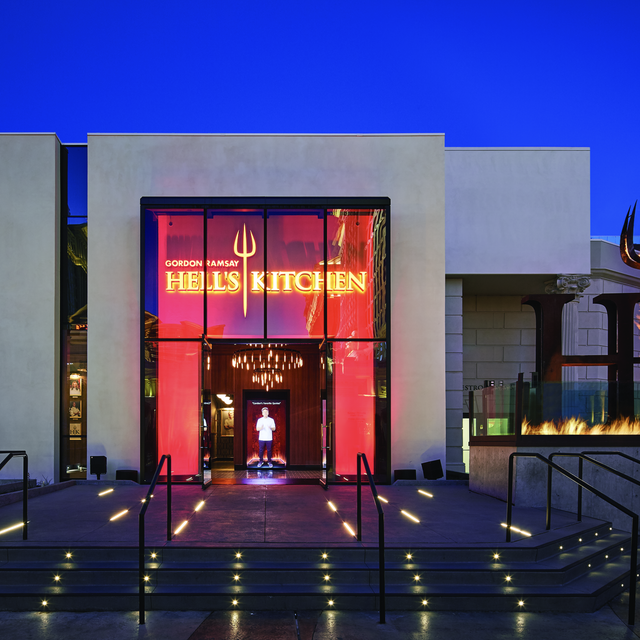
Image Source: resizer.otstatic.com
Deciphering the Hell’s Kitchen Reservation Policy
First, let’s get acquainted with the Hell’s Kitchen reservations policy. Restaurants of this caliber often have specific rules to manage demand and ensure a smooth operation.
- Booking Window: Reservations typically open a certain number of days or weeks in advance. This window can vary, but often it’s around 30-60 days out. It’s crucial to know when the booking period opens to be among the first to try.
- Reservation Platforms: Hell’s Kitchen primarily uses online platforms like OpenTable or their own proprietary booking system for Hell’s Kitchen dining reservations. Familiarize yourself with these platforms beforehand.
- Party Size Limits: Some restaurants have limits on party sizes for standard reservations. Larger groups may need to inquire about private dining or special arrangements.
- Credit Card Guarantee: Expect to provide a credit card to guarantee your reservation. This is a common practice to prevent no-shows. You’ll usually be charged a fee if you don’t cancel within the specified timeframe.
- Cancellation Policy: Always check the cancellation policy. There’s usually a window (e.g., 24-48 hours) within which you can cancel without penalty. Missing this can result in a charge to your card.
- Dress Code: While Hell’s Kitchen is a vibrant, upscale establishment, the dress code is generally smart casual. Avoid overly casual attire like athletic wear, flip-flops, or ripped clothing. Think nice jeans or slacks, a collared shirt for men, and stylish outfits for women.
How to Book Hell’s Kitchen: Your Step-by-Step Plan
Mastering how to book Hell’s Kitchen requires a strategic approach. It’s not just about luck; it’s about preparation and timing.
Step 1: Identify the Correct Restaurant Location
Gordon Ramsay’s Hell’s Kitchen has multiple locations, most famously in Las Vegas and Lake Tahoe. Ensure you are targeting the correct restaurant for your desired reservation. The booking process will differ slightly between locations.
Step 2: Know When Reservations Open
This is perhaps the most critical piece of information.
* Research the specific opening time: Check the restaurant’s official website or their booking platform (e.g., OpenTable) for details on when new reservations are released. Some release at midnight, others at specific times of the day.
* Set Reminders: Once you know the date and time, set multiple reminders on your phone or calendar.
Step 3: Create an Account on the Booking Platform
If Hell’s Kitchen uses OpenTable or a similar service, create an account in advance.
* Complete your profile: Fill in your details accurately, including your name, email, and phone number.
* Save payment information: If the platform allows, save your credit card details to speed up the booking process once you find availability.
Step 4: Be Ready the Moment Reservations Become Available
When the booking window opens, be logged in and ready to search.
* Have your desired date and time range in mind: While flexibility helps, knowing your preferred times increases efficiency.
* Be prepared for high traffic: The website will likely experience a surge in visitors. Keep refreshing if necessary, but avoid excessive clicking that could get you timed out.
Step 5: Navigating the Booking Interface
Once you’re on the booking page:
* Select your party size: This is crucial. If you have a larger group, you might need to split it into smaller tables, or look for specific large party availability.
* Choose your date and time: Look for the earliest available slots or those that best suit your plans.
* Browse available times: The system will show you what’s open. If your ideal time isn’t there, try adjacent times or even different days.
Step 6: Confirm Your Reservation
After selecting a time:
* Review the details: Double-check the date, time, location, and party size.
* Enter any special requests: Many booking systems have a field for special requests (e.g., dietary restrictions, birthday celebrations). Use this wisely, but don’t expect guaranteed fulfillment for everything.
* Complete the booking: Click the final confirmation button. You should receive an email confirmation shortly after.
Maximizing Your Chances: Hell’s Kitchen Reservation Tips
Securing a reservation at Hell’s Kitchen isn’t just about being quick; it’s about being smart. Here are some key Hell’s Kitchen reservation tips to boost your success rate.
Be Flexible with Dates and Times
This is the golden rule.
* Mid-week vs. Weekends: Weekdays (Tuesday, Wednesday, Thursday) often have more availability than Fridays or Saturdays.
* Lunch vs. Dinner: Lunch reservations can be easier to obtain than dinner slots.
* Off-Peak Hours: Consider very early or very late dining times.
Consider Different Party Sizes
If you have a larger group, booking a single table for everyone might be extremely difficult.
* Split Your Party: If possible, try booking two smaller tables for your group. This significantly increases your chances of finding availability.
* Inquire About Group Bookings: For very large parties, contact the restaurant directly to see if they offer private dining options or have specific procedures for group reservations.
Utilize the Hell’s Kitchen Waitlist
If you don’t immediately find a table, don’t despair. Many booking systems offer a waitlist option.
* Sign Up: If Hell’s Kitchen uses OpenTable or a similar platform, ensure you sign up for the waitlist for your desired date and time.
* Be Responsive: If you receive a notification that a table has become available, act immediately. These opportunities are often short-lived.
Leverage Different Booking Channels
While the primary booking is usually online, there might be other avenues.
* Phone Reservations: While most places prioritize online bookings, some might take phone reservations, especially for specific requests or larger groups. Find the direct number for the Hell’s Kitchen location you’re interested in.
* Concierge Services: If you’re staying at a hotel, especially in Las Vegas, their concierge service can sometimes assist with securing difficult reservations.
Consider Dining During Special Events or Holidays
This is a double-edged sword. While demand will be higher, some restaurants might release special blocks of reservations for these periods. However, it’s generally easier to get a reservation outside of major holidays.
Be Persistent
Don’t give up after the first attempt.
* Check Back Frequently: Cancellations happen all the time. Keep checking the booking platform periodically, especially closer to your desired date.
* Try Different Browsers or Devices: Occasionally, technical glitches can occur. Trying a different browser or device might yield different results.
Booking a Table Hell’s Kitchen: What to Expect
The booking a table Hell’s Kitchen experience is designed to be efficient and informative.
The Online Booking Interface
You’ll typically encounter a calendar view where you can select your desired date. Once a date is chosen, available times for your party size will be displayed. Look for green indicators signifying availability and red for fully booked slots.
Reservation Confirmation
Upon successful booking, you will receive an email confirmation. This email will contain:
* Your reservation details (date, time, party size).
* The restaurant’s address and contact information.
* The cancellation policy and deadline.
* Any specific notes or dress code reminders.
Keep this confirmation accessible, as you might need to present it or refer to it upon arrival.
What to Do if You Can’t Get a Reservation
If, despite your best efforts, you can’t secure a reservation, consider these alternatives:
- Walk-In Policy: Some restaurants, especially those in high-traffic tourist areas like Las Vegas, may accept a limited number of walk-ins. This usually involves waiting in line. Research the specific restaurant’s walk-in policy. Be prepared to arrive early, potentially before opening hours.
- Bar Seating: Often, restaurants hold back a portion of their seating for walk-ins, which might include bar seats. If you’re flexible and don’t mind a more casual dining experience, this can be a good option. You might even get to interact with the bartenders.
- Resorts World Las Vegas: For the Las Vegas location, check if there are any special dining packages or experiences through Resorts World that might offer priority access or alternative dining arrangements.
The Hell’s Kitchen Restaurant Booking Process: A Closer Look
The Hell’s Kitchen restaurant booking process is a refined system designed to handle a high volume of requests.
Step 1: Initial Search
You visit the booking platform (e.g., OpenTable). You input the restaurant name, desired date, time, and number of guests.
Step 2: Availability Check
The system scans its database for available tables that match your criteria. This involves checking against existing reservations and the restaurant’s capacity for that specific time slot.
Step 3: Displaying Options
If there are available times, they are displayed. If not, you might see a “no availability” message, prompting you to try different times or dates.
Step 4: Selection and Detail Input
You select your preferred time slot. You’ll then be asked to provide or confirm your contact information.
Step 5: Guarantee and Confirmation
You’ll be prompted to provide credit card details to guarantee the reservation. This is a critical step. Once submitted and verified, your reservation is confirmed, and you receive an email.
Step 6: Post-Booking Management
You can usually manage your reservation through the booking platform – change the time (if possible), update party size, or cancel within the allowed timeframe.
Understanding Hell’s Kitchen Table Availability
Hell’s Kitchen table availability is notoriously scarce, especially during peak hours and on weekends. This scarcity is a direct result of the restaurant’s popularity, driven by the global fame of Gordon Ramsay and the captivating “Hell’s Kitchen” television show.
| Day of the Week | Peak Dinner Availability | Mid-Week Dinner Availability | Lunch Availability |
|---|---|---|---|
| Monday | Very Low | Moderate | Moderate |
| Tuesday | Low | Good | Good |
| Wednesday | Low | Good | Good |
| Thursday | Low | Good | Good |
| Friday | Very Low | Low | Moderate |
| Saturday | Very Low | Very Low | Low |
| Sunday | Very Low | Low | Moderate |
Note: This table is a general guide. Actual availability can fluctuate significantly.
Factors influencing Hell’s Kitchen table availability:
- Time of Year: Tourist seasons (holidays, summer) see higher demand.
- Day of the Week: As noted, weekends are the hardest to book.
- Time of Day: Prime dinner hours (6:00 PM – 9:00 PM) are most competitive.
- Special Events: Conventions, holidays, or major sporting events in the city will drastically reduce availability.
- Local Factors: Live entertainment or other major attractions at the venue (e.g., Caesars Palace, Resorts World) can impact demand.
Get a Table at Hell’s Kitchen: Beyond the Basics
To truly get a table at Hell’s Kitchen, think about the nuances of the dining experience and how that might influence your booking strategy.
The Dining Experience
Hell’s Kitchen is designed to mimic the fast-paced, high-stakes environment of the TV show. Expect:
* Open Kitchen: You can often see the chefs at work.
* The Red Team vs. Blue Team: Servers are often organized into these two teams, adding to the theme.
* Signature Dishes: Expect to see classics like Beef Wellington, Sticky Toffee Pudding, and pan-seared scallops on the menu.
* The 7-Course Prix Fixe Menu: This is often the highlight, offering a curated taste of the restaurant’s best.
Special Occasions
If you are celebrating a special occasion, mention it when booking or arrive with a copy of your reservation and mention it to your server or the host. While not guaranteed, restaurants often try to acknowledge special events with a small gesture, like a complimentary dessert.
Dietary Restrictions
Hell’s Kitchen is equipped to handle most common dietary restrictions.
* Inform in Advance: The best way to ensure your needs are met is to mention any allergies or dietary requirements during the booking process or at least a few days before your reservation by calling the restaurant directly.
* Communicate with Your Server: On the day of your reservation, reiterate your dietary needs to your server. They can guide you through the menu and advise on modifications.
Frequently Asked Questions (FAQ)
Q1: Can I make a reservation by calling the restaurant directly?
While the primary method for Hell’s Kitchen restaurant booking is typically online, some locations might accept phone reservations, especially for larger parties or specific requests. It’s always best to check the restaurant’s official website for the most accurate contact information and booking procedures.
Q2: How far in advance should I book Hell’s Kitchen?
For prime times and dates, it’s advisable to book as soon as reservations become available, which is often 30-60 days in advance. For less popular times, you might have more flexibility, but booking a few weeks ahead is still recommended to ensure you get a table at Hell’s Kitchen.
Q3: What happens if I arrive late for my reservation?
Most restaurants, including Hell’s Kitchen, hold reservations for a grace period, typically 10-15 minutes. If you anticipate being later, it’s crucial to call the restaurant and inform them. Failure to do so may result in your reservation being canceled, and you could incur a no-show fee if a credit card was used to guarantee it.
Q4: Is it possible to get a reservation on the same day?
While difficult, it’s not entirely impossible. Some reservations become available due to cancellations. Regularly checking the online booking platform or inquiring about the walk-in or Hell’s Kitchen waitlist policy can sometimes lead to same-day opportunities.
Q5: Are there any age restrictions for dining at Hell’s Kitchen?
Generally, Hell’s Kitchen is a family-friendly restaurant, but it caters to an adult dining experience. While children are usually welcome, the lively atmosphere and the focus on fine dining might be more suitable for older children and adults. It’s always a good idea to check the specific policy for the location you plan to visit, especially if you have very young children.
By following this detailed guide, you’ll be well-equipped to navigate the Hell’s Kitchen restaurant booking process and increase your odds of experiencing one of the most talked-about dining destinations in the world. Remember, persistence, flexibility, and a bit of strategic planning are your best allies in securing that coveted Hell’s Kitchen table availability.